ClaimsGateway Webhooks Documentation
Webhooks are a way to integrate your applications with ClaimsGateway, allowing you to receive real-time updates whenever specific events occur on ClaimsGateway.
Table of contents
Webhook requests
When an event occurs, ClaimsGateway will send a POST request to a specified URL.
The webhook body will be a JSON resource object that relates to the event. The request headers will include:
- A
content-typeheader set toapplication/json - A
x-request-timestampwith the time the webhook was sent - A
x-request-signatureheader containing the request signature (if configured). Read on for information about validating request signatures.
Below is an example of webhook event data.
{
  "record_type": "claim",
  "action_type": "claim_approved",
  "claim": {
    "id": 1,
    "structure_id": 1,
    "status": "open",
    "notified_at": "2026-01-01",
    "assignee_id": 1,
    "vulnerable_customer": false,
    "vulnerability_reason": "",
    "data": {
      "claimed_at": "2026-01-04T00:00:00.000+11:00",
      "description": "Description of claim.",
      "address_country": "AU",
      "address_street": "Gwenda Rapid",
      "address_city": "Lake Buddy",
      "address_state": "NSW",
      "address_postcode": "2362",
      "address": "Gwenda Rapid, Lake Buddy NSW 2362, Australia"
    },
    "sections": {
      "public_liability": {
        "description": "Sint impedit et. Quia molestiae veritatis. Cupiditate quia quae.",
        "items": [
          {
            "payee": "John Smith",
            "amount": "557.00"
          }
        ]
      }
    },
    "claimant": {
      "first_name": "John",
      "last_name": "Smith",
      "email": "john.smith@mail.test",
      "address_country": "AU",
      "address_street": "5629 Irving Camp",
      "address_city": "Park Acres",
      "address_state": "NSW",
      "address_postcode": "5185",
      "address": "5629 Irving Camp, 5185 NSW Park Acres, Australia",
      "phone": "422314646",
      "phone_country": "AU",
      "phone_formatted": "+61 422 314 646",
      "phone_normalised": "+61422314646"
    },
    "client": {
      "name": "Company PTY Ltd",
      "abn": "6883915880"
    }
  },
  "item": {
    "payee": "John Smith",
    "amount": "557.00"
  },
  "document": {
    "id": 1,
    "type": "photos"
  }
}
Important note: The structure of the claim object will differ depending on your configuration. Please refer to your swagger file to check the exact structure of the response.
Creating a webhook
To create a webhook you need to access ClaimsGateway’s Webhook configuration page:
- Main Menu “Configurations” -> “Tenant”
- Then “Webhooks” tab.
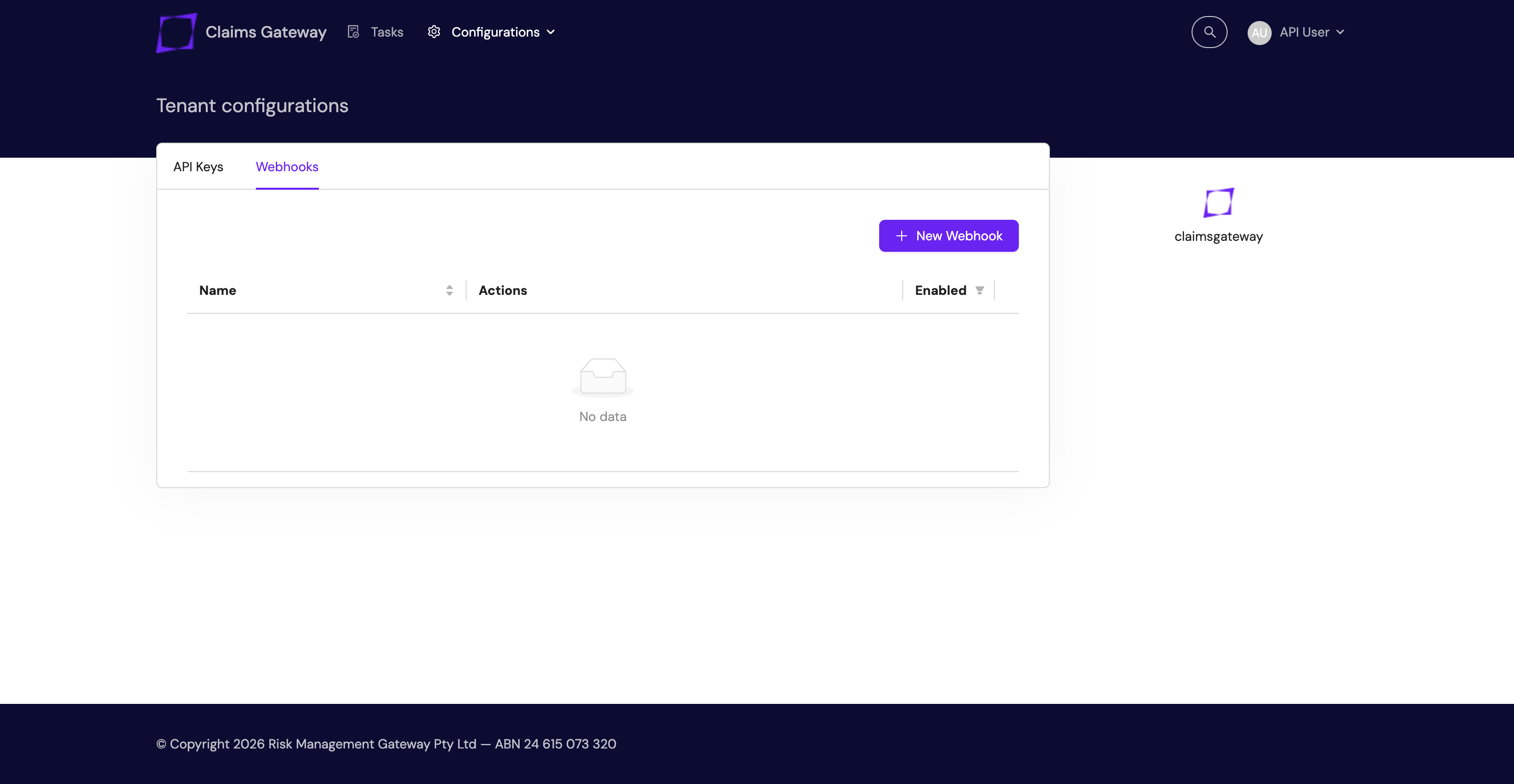
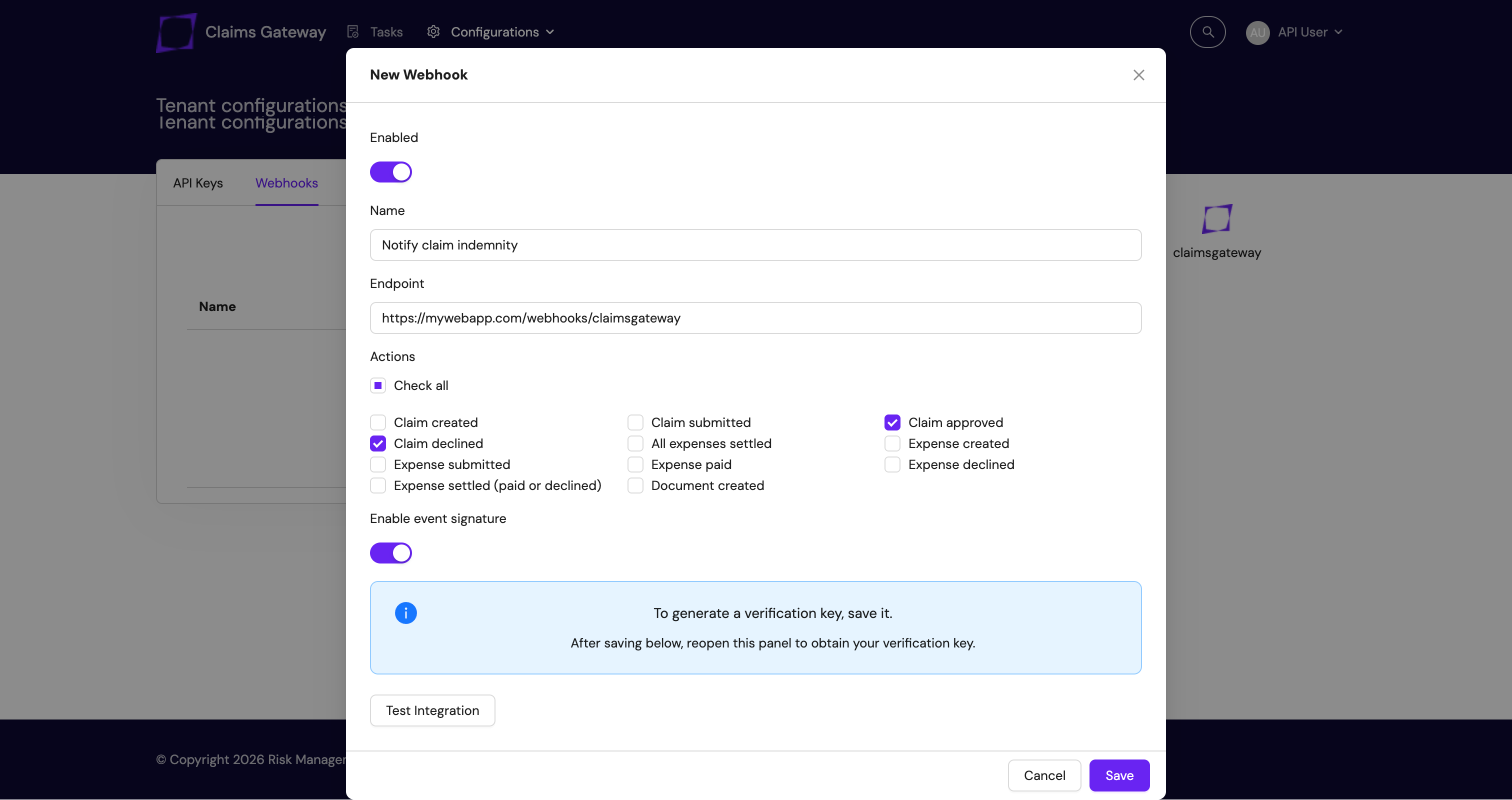
- Click “New Webhook” and complete the form
- Name: Write the name for the webhook
- Endpoint: the endpoint of your application where the webhook is going to post the requests
- Actions: Select the action to which you want to be notified
- Enable event signature: if you want to add a signature to the webhook requests
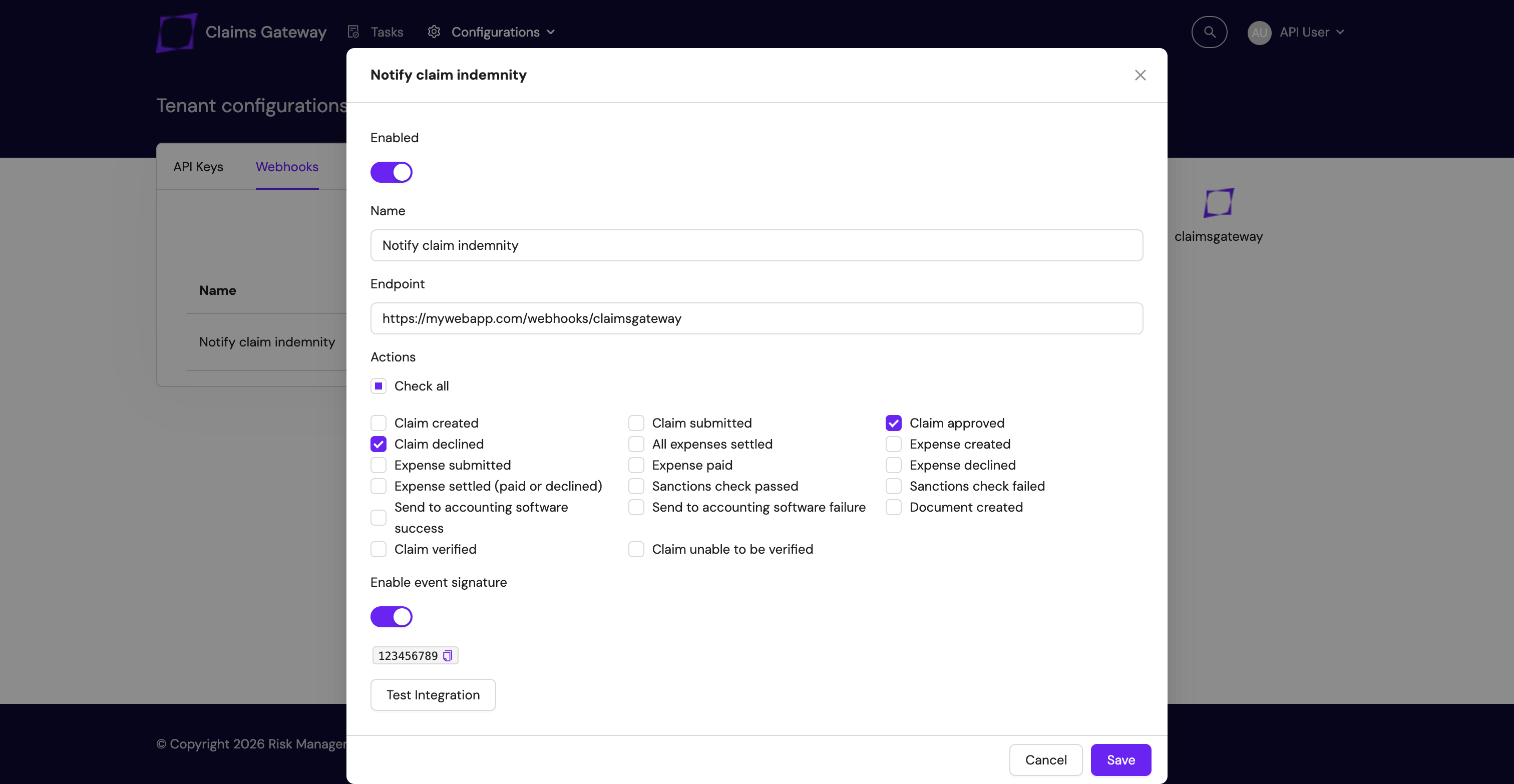
- After saving you can see the event signature secret.
Event types
| action_type | record_type | Description |
|---|---|---|
| claim_creation | claim | The claim is created as draft |
| claim_submission | claim | The claim is submitted. If you create a claim via API as submitted, you will receive both claim_creation and claim_submission events |
| claim_approved | claim | When claim indemnity was changed to approved |
| claim_declined | claim | When claim indemnity was changed to declined |
| items_settled | claim | When all expenses have been paid or declined |
| item_creation | item | When expense was created |
| item_submission | item | When expense was submitted |
| item_paid | item | When item was paid |
| item_declined | item | When item was declined |
| item_settled | item | When item was paid or declined |
| document_creation | document | When a document was created |
Record types
Depending on the event, the webhook will send a claim, item or document. Structure of each of those records is documented on your Swagger file.
The nodes item and document are only sent if the record_type is item or document, respectively. The node claim is sent in all webhook events.
Validating request signatures
ClaimsGateway provides methods to verify that requests are genuinely coming from the ClaimsGateway API by using signatures included in the request headers.
Request headers
x-request-timestamp: The time the webhook was sent, represented in Unix epoch time format.x-request-signature: The request signature, formatted as a SHA-256 HMAC hash. It uses the generated token secret when the webhook was created in the ClaimsGateway portal.
To ensure the authenticity of a webhook request from ClaimsGateway, validate the request signature using the provided headers and your webhook’s associated signing key.
Steps to signature verification
1. Verify if timestamp is within acceptable window
Check the x-request-timestamp header to ensure the request is recent. A request older than 5 minutes may indicate a replay attack.
2. Generate the content to be hashed
You will need to build a string with the following format:
HTTP METHOD (POST)
timestamp
webhook path
query params (if any)
request body
Example
POST
1445398140
/webhooks/claimsgateway
{"record_type":"claim","action_type":"claim_approved","claim":{}}
3. Generate the HMAC hash
Use the generated secret in ClaimsGateway and the SHA-256 hashing algorithm to generate the HMAC hash.
4. Compare the generated hash with the provided signature
Compare the generated HMAC hash with the x-request-signature header from the request. A match confirms the request’s legitimacy; otherwise, it should be considered potentially tampered with or fraudulent.
Example
Below is an example of how to confirm the signature in Ruby, Node.js and Python.
def verify_signature
  # ********* 1. VERIFY IF TIMESTAMP IS WITHIN ACCEPTABLE WINDOW *********

  # reads request header x-request-timestamp
  timestamp = request.headers['x-request-timestamp']
  # defines validity window
  timestamp_validity_window = 5.minutes

  # converts UNIX Timestamp to Ruby Time object
  time = Time.zone.at(timestamp.to_i)

  # checks if timestamp is within window
  return false if (time + timestamp_validity_window).past?

  # ********* 2. GENERATE THE CONTENT TO BE HASHED *********

  # reads request method
  method = request.method
  # reads request body
  body = request.body.read
  # Converts URL string from request to URI object
  uri = URI.parse(request.url)

  # Builds an array with all lines to sign
  lines = [
    method, # HTTP method (POST)
    timestamp, # Timestamp received in request header x-request-timestamp
    uri.path || '/', # URL path or '/' if empty
    uri.query, # adds query params
    body
  ]

  # Removes empty lines and joins everything separating by `\n`
  content_to_sign = lines.compact_blank.join("\n")

  # ********* 3. GENERATE THE HMAC HASH *********

  # Secret key from ClaimsGateway
  secret_key = '123456789'

  # reads request header x-request-signature
  signature = request.headers['x-request-signature']

  # initialize hmac object
  hmac = OpenSSL::HMAC.new(secret_key, OpenSSL::Digest.new('sha256'))

  # updates hmac object with the string to sign
  hmac.update(content_to_sign)

  generated_hash = hmac.hexdigest

  # ********* 4. COMPARE THE GENERATED HASH WITH THE PROVIDED SIGNATURE *********

  # Use secure comparison between signature received in request header and
  ActiveSupport::SecurityUtils.secure_compare(signature, generated_hash)
end
const crypto = require('crypto');

function verifySignature(req, body) {
  const timestamp = req.headers['x-request-timestamp'];
  if (!timestamp) return false;

  const timestampValidityWindow = 5 * 60 * 1000;
  const requestTime = parseInt(timestamp, 10) * 1000;

  if (Date.now() - requestTime > timestampValidityWindow) return false;

  const fullUrl = new URL(req.url, `http://myserver.com`);
  const path = fullUrl.pathname || '/';
  const query = fullUrl.search ? fullUrl.search.slice(1) : null;

  const lines = [req.method, timestamp, path, query, body];
  const contentToSign = lines.filter(Boolean).join('\n');

  const secretKey = '123456789';
  const signature = req.headers['x-request-signature'];
  if (!signature) return false;

  const generatedHash = crypto
    .createHmac('sha256', secretKey)
    .update(contentToSign)
    .digest('hex');

  const signatureBuffer = Buffer.from(signature);
  const hashBuffer = Buffer.from(generatedHash);

  if (signatureBuffer.length !== hashBuffer.length) return false;

  return crypto.timingSafeEqual(signatureBuffer, hashBuffer);
}
import hmac
import hashlib
import time
from urllib.parse import urlparse

SECRET_KEY = b'123456789'

def verify_signature(headers, method, path_and_query, body):
    # ********* 1. VERIFY TIMESTAMP *********
    timestamp = headers.get('x-request-timestamp')
    if not timestamp:
        return False

    try:
        request_time = int(timestamp)
    except ValueError:
        return False

    # 5-minute validity window (300 seconds)
    validity_window = 300
    if time.time() - request_time > validity_window:
        return False

    # ********* 2. GENERATE CONTENT TO BE HASHED *********
    parsed_url = urlparse(path_and_query)
    path = parsed_url.path or '/'
    query = parsed_url.query or None

    lines = [
        method,
        timestamp,
        path,
        query,
        body.decode('utf-8')
    ]

    # Filter out empty/None values and join with '\n' (equivalent to compact_blank)
    content_to_sign = '\n'.join([line for line in lines if line])

    # ********* 3. GENERATE HMAC HASH *********
    signature = headers.get('x-request-signature')
    if not signature:
        return False

    generated_hash = hmac.new(
        SECRET_KEY,
        content_to_sign.encode('utf-8'),
        hashlib.sha256
    ).hexdigest()

    # ********* 4. COMPARE HASHES SAFELY *********
    return hmac.compare_digest(signature, generated_hash)